
A Universal Standard for Windows App Deployment
For enterprise IT administrators and application packagers, managing software deployment across Microsoft Intune, SCCM (MCM), or custom CI/CD pipelines has long been fragmented. Deployment commands, detection scripts, icons, and packaging notes often end up scattered across internal spreadsheets, SharePoint sites, or local personal drives. When a packager leaves the company, or an application moves to a new system, vital operational knowledge is frequently lost.
With the release of PacKit 3.0, Advanced Installer introduced a groundbreaking solution to this industry-wide pain point: the Open Package Manifest.
What is the Open Package Manifest and how to enable it?
The Open Package Manifest is an open, vendor-neutral, and platform-agnostic specification designed to describe Windows application deployment metadata independently of the tool that built it.
Instead of locking packaging data inside a proprietary cloud database or a specific software vendor’s UI, the Open Package Manifest ensures that packaging information travels directly alongside the application payload.
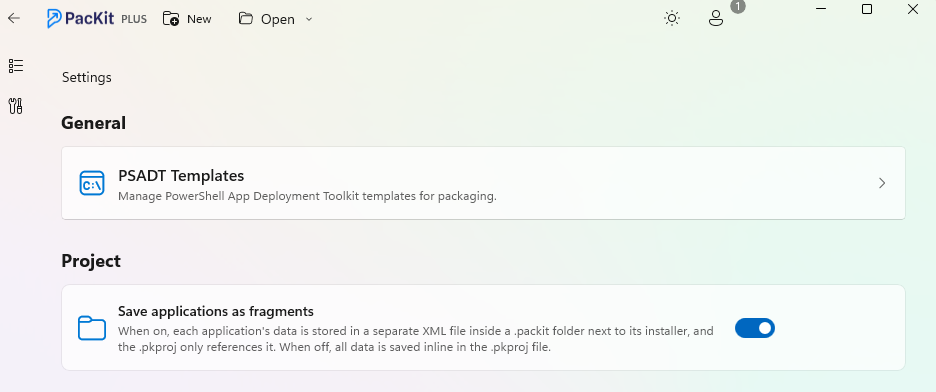
To enable it, just go to the Settings view and enable the Save applications as fragments option:
Core Principles
1. The PacKit Folder as the Single Source of Truth
Under this paradigm, every application version resides in its own dedicated directory containing the raw installer (MSI, EXE, PowerShell script, MSIX, etc.) alongside a standardized packit folder. This folder holds data like:
- Application descriptions and publisher metadata.
- Silent install and uninstall command lines.
- Detection scripts and extracted icons.
- Target platform assignments and configuration properties.
Because all metadata is stored locally alongside the binaries, sharing a package with a colleague or moving it between environments is as simple as copying the folder.
2. Platform Agnostic & Automation Friendly
The Open Package Manifest is designed to act as a common language across different deployment ecosystems:
- Multi-Tool Compatibility: Whether a package was created using Advanced Installer, WiX, Inno Setup, or custom scripts, the manifest can describe its deployment requirements.
- Deployment Targets: The manifest can be consumed to push applications directly into Microsoft Intune, SCCM, PDQ Deploy, or custom repository managers.
3. Complete Governance and On-Premises Control
For organizations with strict compliance requirements (e.g., healthcare, government, energy), keeping full governance over application packages is critical. The Open Package Manifest runs entirely on-premises without requiring mandatory external databases or cloud synchronization.
Using the Open PowerShell Module
To ensure true openness, PacKit published a dedicated, free PowerShell Module on GitHub.
This allows IT teams and software developers to programmatically generate, validate, and consume package manifests without relying on a GUI.
Conclusion
The Open Package Manifest shifts application packaging from an isolated, vendor-locked task into a portable, version-controlled standard. By enabling application metadata to reside alongside installer binaries, PacKit 3.0 provides IT administrators with a reliable, scriptable, and platform-independent foundation for Windows package management.
For more details, code samples, and community contributions, check out the PacKit Webinar on YouTube or visit the open-source repository on GitHub.
