
PacKit Release Notes
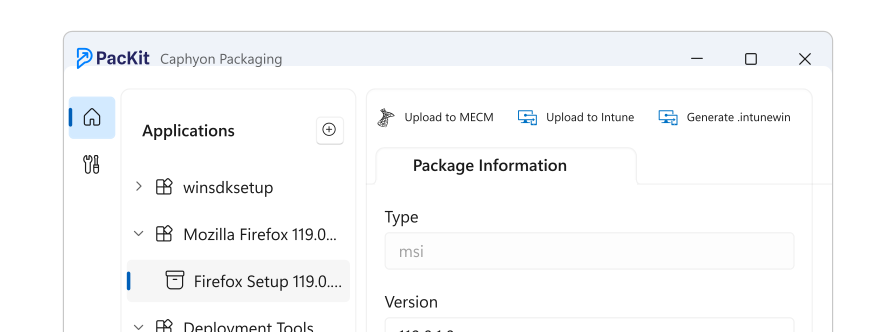
Get the Latest Version
3.2
NEW FEATURE
Import SCCM packages
NEW FEATURE
Intune GCC High support
ENHANCEMENTS
"Run script locally" option for the PowerShell script editor
ENHANCEMENTS
Import return codes from SCCM applications
ENHANCEMENTS
Import specific/multiple deployments from SCCM applications
ENHANCEMENTS
New algorithm to extract icons from previously unsupported EXE bootstrappers
ENHANCEMENTS
Better error messages for admins with missing roles or permissions in Intune
ENHANCEMENTS
PSADT script parameters are now synchronized with the Application View
BUG FIXES
PacKit failed if .Net 9 was missing from the machine
BUG FIXES
Check for WinGet updates failed in certain scenarios
BUG FIXES
An incorrect package type was set in Intune when uploading an MSIX package
BUG FIXES
Assignments were not loaded when loading a .packit folder, if they were not previously cached in the workspace
BUG FIXES
Fixed an integration issued with Advanced Installer
BUG FIXES
The GUI failed to refresh some controls when a version of a packages was deleted
BUG FIXES
Fixed a sign-in error message when importing applications from Intune
3.1
NEW FEATURE
Scope Tags targeting for Intune
NEW FEATURE
Customizable Default Return Codes
NEW FEATURE
Intune Install Status Reports - Monitor tab
NEW FEATURE
SSO - Sign in with your Microsoft or GitHub account
ENHANCEMENTS
Improved the package detection algorithm when importing resources from a folder
BUG FIXES
Install and Uninstall custom command lines were reset when updating an application from WinGet
BUG FIXES
The main package was set incorrectly for some applications imported from WinGet
BUG FIXES
Default command lines for MSI packages were broken
BUG FIXES
Fixed the integration between PacKit 3.0 and Advanced Installer
3.0
NEW FEATURE
Breaking changes - workspaces created with older versions need to be manually migrated - contact us for assistance
NEW FEATURE
".packit" package manifest generated for each application version - separating the applications state from the workspace for enhanced collaboration and automation capabilities
NEW FEATURE
PowerShell Module for creating and reading ".packit" package manifests
NEW FEATURE
Switching to a "Source Folder" logic for all applications
NEW FEATURE
Expanded the list of Intune detection methods - 100% coverage
NEW FEATURE
A new start page listing all the applications from the current workspace - an application can have multiple packages(versions)
NEW FEATURE
Re-organized the left-side menu around managing one application and its updates - each application version is listed in the left side menu.
2.2
NEW FEATURE
SCCM App Import & Migration to Intune - full GUI, no scripting
NEW FEATURE
Intune App Import & synchronization with Winget catalog for app updates
NEW FEATURE
Custom PSADT templates
NEW FEATURE
Dark theme
ENHANCEMENTS
Updated default template of PSADT to v4.18
ENHANCEMENTS
Built-in mechanism for updating the PSADT default template when a new one is released
ENHANCEMENTS
Automaticaly update an existing Intune application when re-uploading the same version (until now a new app was created)
ENHANCEMENTS
Display the package version and status next to the package name
BUG FIXES
Some .Intunewin files were encrypted two times, corrupting the application upload
BUG FIXES
PacKit not releasing the handle for some .ico files when adding certain apps from the catalog
BUG FIXES
Launch conditions for Server 206 and 2019 were included to prevent installing PacKit on unsupported OSes
2.1
NEW FEATURE
WinGet app scan and match - find WinGet updates for any package
NEW FEATURE
Predefined scripts set as install detection mechanism for EXE packages
NEW FEATURE
Digital signing support for PSADT scripts
NEW FEATURE
Digital Signing support for detection scripts
NEW FEATURE
Synchronized package details inside the PSADT script, placeholders replaced at upload time
ENHANCEMENTS
Multi-tenant support for Intune
ENHANCEMENTS
Improved error handling for failed packaged downloads from WinGet
ENHANCEMENTS
Save relative paths for all the resources from the same drive as the workspace
BUG FIXES
The folders hierarchy inside an .intunewin file was broken for some PSADT-based packages
BUG FIXES
Parsing some command lines failed when wrapping a package with PSADT
BUG FIXES
Progress bar messages get stuck while importing any catalog app in PacKit
BUG FIXES
Update the icon for missing files from apps list when switching between apps
BUG FIXES
Random crashes on repetitive app navigations
2.1.1
BUG FIXES
PacKit crashed when accessing the log in link from the start page
2.0
NEW FEATURE
PSADT 4.x support
NEW FEATURE
Add multiple package sources: EXE, MST, etc.. to an existing application
BUG FIXES
Replaced a broken feedback link
1.9
NEW FEATURE
PSADT inline editor
ENHANCEMENTS
Log the date of the most current upload to Intune, for each package
1.8
NEW FEATURE
Migrate packages from SCCM to Intune, via CSV export
NEW FEATURE
Integration with Advanced Installer
ENHANCEMENTS
GUI refresh - simpler UX and a cleaner package organization, new icons
BUG FIXES
PacKit failed to load certain projects on double-click
1.7
NEW FEATURE
Create EntraID groups directly from PacKit
NEW FEATURE
Global search support for your packages
ENHANCEMENTS
Update PSADT import support to work with v3.10.1 and v3.10.2 templates
ENHANCEMENTS
Improved detection and automatic installation of Trusting Signing tools via Winget
1.6
NEW FEATURE
Import package details from PSADT script and deploy to Intune
NEW FEATURE
Clone existing custom package configuration when manually updating an application
ENHANCEMENTS
Customizable Install and Uninstall commands for PSADT packages
ENHANCEMENTS
Refreshed the packages icons to simplify package navigation
ENHANCEMENTS
Updates for Microsoft Trusted Signing Tools
BUG FIXES
Hover failed to launch due to a change in platform dependencies
1.5
NEW FEATURE
Updates Notification for WinGet applications
NEW FEATURE
Digital Signing for MSIX packages - Azure Trusted Signing or local certificates
ENHANCEMENTS
Improvement the App Assignment support for Intune
ENHANCEMENTS
Save catalog applications in separate folders
ENHANCEMENTS
Store the assigned Intune appId in the workspace file
1.4
NEW FEATURE
Launching PacKit Plus - Paid Edition
NEW FEATURE
Intune App Assignment (Plus)
NEW FEATURE
Intune Detection Rules
ENHANCEMENTS
Display the package version in the tree
BUG FIXES
Fixed .MSIX package extension handling
1.3
NEW FEATURE
Rebuilt the Intune authentication service - the session will persist as long as the application is running, without requiring to log in for each upload operation
NEW FEATURE
Automatically generate the.intunewin file when uploading a package as Win32
NEW FEATURE
Reuse the command line from an older version of the package when a new version is added
NEW FEATURE
Extract the application icon from EXE setup
ENHANCEMENTS
Version selector for applications found in the WinGet app catalog
ENHANCEMENTS
Download catalog applications in individual folders
ENHANCEMENTS
Multiple search improvements for the app catalog
BUG FIXES
Fixed the toast notifications for new PacKit updates
BUG FIXES
Fixed icon handling for applications added from the WinGet catalog
BUG FIXES
Fixed the manual icon update
1.2
NEW FEATURE
WinGet integration, add pre configured packages in your workspace via our new App Catalog
NEW FEATURE
Silent command line finder - search for a package in our new catalog and copy the command line visible in the package preview pane
ENHANCEMENTS
Automatically open the output folder when wrapping a package with PSADT
ENHANCEMENTS
Reuse the install command line from another sibling package when generating the .intunewin file
BUG FIXES
Reuse the install command line from another sibling package when generating the .intunewin file
1.1
NEW FEATURE
PSAppDeployToolkit Integration
NEW FEATURE
MSIX troubleshooting tools
1.0
NEW FEATURE
Workspaces
NEW FEATURE
Automated .Intunewin File Generation
NEW FEATURE
Intune & MECM Integration
